# LEGO Island Decompilation
[Development Vlog](https://www.youtube.com/playlist?list=PLbpl-gZkNl2COf_bB6cfgTapD5WduAfPz) | [Contributing](https://github.com/isledecomp/isle/blob/master/CONTRIBUTING.md) | [Matrix](https://matrix.to/#/#isledecomp:matrix.org) | [Forums](https://forum.mattkc.com/viewforum.php?f=1) | [Patreon](https://www.patreon.com/mattkc)
This is a **work-in-progress** decompilation of LEGO Island version 1.1. It aims to 100% match the original instructions where possible. The goal is to provide a codebase that can be modified, improved, and ported to other platforms.
## Status
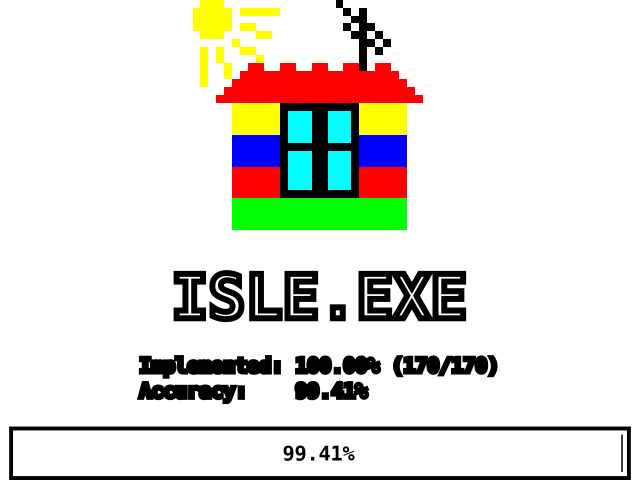
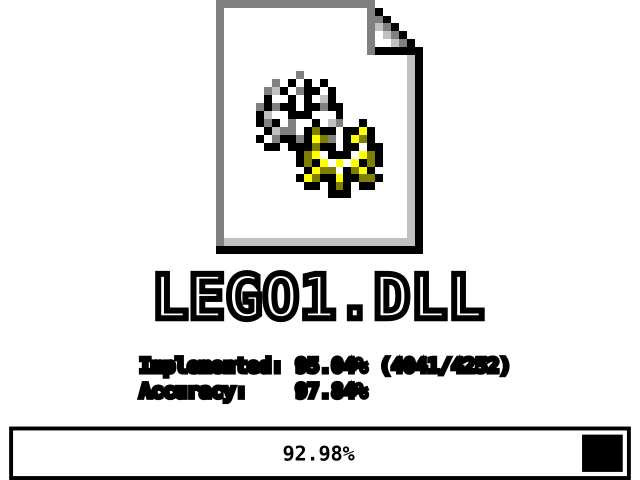 * `ISLE.EXE` is completely decompiled and behaves identically to the original. A handful of instructions aren't matching, however we anticipate they will as more of the overall codebase is implemented.
* `LEGO1.DLL` is still very incomplete and not close to playable yet.
* If you want to test things out, pair the decompiled `ISLE.EXE` with the `LEGO1.DLL` from the original game.
## Build Requirements
Here are all the artifacts involved in the build process in some way:
* **[CMake](https://cmake.org/)** *(you must install this)* - A copy is often included with the "Desktop development with C++" workload in newer versions of Visual Studio, however it can also be installed as a standalone app.
* **Lego Island 1.1** *(downloaded automatically by build)* - A copy of the original game is needed to compare the decomped results against. A copy of LEGO1.DLL will be downloaded automatically for comparison purposes, but you will need to acquire the game assets yourself to pair with the exe / dll if you want to play the game.
* **Microsoft Visual C++ 4.2** *(downloaded automatically by build)* - This compiler was used to build the original game. It can be found on many abandonware sites, but the installer can be a little iffy on modern versions of Windows. The default workflow downloads and uses [this portable version](https://github.com/itsmattkc/msvc420) instead.
* **DirectX 5 SDK** *(not currently needed)*. Similarly, this can be found on many abandonware sites. Currently not needed by the code decomped so far but will be needed in the future once we get to 3d rendering functions.
## Building (Default Workflow)
### Default Workflow with VSCode
This projects uses the [CMake](https://cmake.org/) build system, which allows for a high degree of versatility regarding compilers and development environments.
We provide a default development workflow through `configure.py` and `build.py`, along with an associated `tasks.json`, such that VSCode can build the isle repo out of the box and you can dive right into writing code. If you want to use the default workflow, open your clone of the repo in VSCode, hit Ctrl+Shift+B, and run `Configure decomp with standard setup` followed by `Build decomp`.
The standard decomping workflow is to repeatedly make edits to a function and run `Build decomp and inspect function by cursor` to work towards a 100% match of that function which can be contributed to the project.
### Default Workflow with Other Editors
The VSCode tasks above are just thin wrappers around invoking `configure.py` and `build.py`. Invoking them with no arguments will do a basic build of the project. You can invoke them from the command line or configure your editor of choice to invoke them.
## Playing the Result
Simply place the compiled `ISLE.EXE` into LEGO Island's install folder (usually `C:\Program Files\LEGO Island` or `C:\Program Files (x86)\LEGO Island`).
Unless you're a developer, disregard the compiled `LEGO1.DLL` for now as it is too incomplete to be usable. Alternatively, LEGO Island can run from any directory as long as `ISLE.EXE` and `LEGO1.DLL` are in the same directory, and the registry keys point to the correct location for the asset files.
## Contributing
If you're interested in helping/contributing to this project, check out the [CONTRIBUTING](https://github.com/isledecomp/isle/blob/master/CONTRIBUTING.md) page.
## Building (Custom Workflow)
For those who wish to understand the build in more detail:
Microsoft Visual C++ 4.20 was used to build the original game. The default workflows above download and use a copy of that specific compiler in order for us to get our desired 100% matching instructions.
The game can be built using a contemporary compiler by invoking `cmake` with your compiler / build system of choice. This will still produce a working game, however it will **not** result in matching instructions which can be contributed to the project.
### Example Custom Build Setup
The following steps produce a working build with matching instructions without using the auto configure / build scripts:
1. Open a Command Prompt (`cmd`).
1. Run `/BIN/VCVARS32.BAT x86` from your copy of Visual C++ 4.2 to set up the environment variables for the compiler.
1. Make a `build` folder in the source repository (the folder you cloned/downloaded).
1. `cd` to the build folder.
1. Configure the project with CMake by running:
`cmake .. -G "NMake Makefiles" -DCMAKE_BUILD_TYPE=RelWithDebInfo`
1. `RelWithDebInfo` is used to produce debug symbols for decompilation work. `Release` will just produce an executable. `Debug` builds are unlikely to be useful since they will differ in code generation from the retail `LEGO1.DLL`.
1. `"NMake Makefiles"` is the native build tool of Visual C++ 4.2. The standard workflow downloads and uses the more modern `"Ninja"` build tool for faster builds.
1. Build the project by running `nmake` or `cmake --build .` from the build folder.
1. When this is done, there should a recompiled `ISLE.EXE` and `LEGO1.DLL` in the build folder.
## Additional Details
### Which version of LEGO Island do I have?
Right click on `LEGO1.DLL`, select `Properties`, and switch to the `Details` tab. Under `Version` you should either see `1.0.0.0` (1.0) or `1.1.0.0` (1.1). Additionally, you can look at the game disc files; 1.0's files will all say August 8, 1997, and 1.1's files will all say September 8, 1997. Version 1.1 is by far the most common, especially if you're not using the English or Japanese versions, so that's most likely the version you have.
### SmartHeap
Both `ISLE.EXE` and `LEGO1.DLL` were originally statically linked with [SmartHeap](http://www.microquill.com/smartheap/sh_tspec.htm), a drop-in replacement for malloc/free that presumably provides better heap memory management on the old low-memory (16MB) systems this game was designed for. Unfortunately, acquiring SmartHeap legally is expensive, and the chances of acquiring the exact same version used by Mindscape in the late 90s is very low. Since it's a drop-in binary-compatible replacement, this decomp can just stick with the standard malloc/free functions while still achieving matching assembly on a per-function level, however the resulting binaries will never be byte accurate as a result of this. If you notice significant size disparities, particularly in ISLE.EXE, the lack of statically linked SmartHeap libraries is why.
* `ISLE.EXE` is completely decompiled and behaves identically to the original. A handful of instructions aren't matching, however we anticipate they will as more of the overall codebase is implemented.
* `LEGO1.DLL` is still very incomplete and not close to playable yet.
* If you want to test things out, pair the decompiled `ISLE.EXE` with the `LEGO1.DLL` from the original game.
## Build Requirements
Here are all the artifacts involved in the build process in some way:
* **[CMake](https://cmake.org/)** *(you must install this)* - A copy is often included with the "Desktop development with C++" workload in newer versions of Visual Studio, however it can also be installed as a standalone app.
* **Lego Island 1.1** *(downloaded automatically by build)* - A copy of the original game is needed to compare the decomped results against. A copy of LEGO1.DLL will be downloaded automatically for comparison purposes, but you will need to acquire the game assets yourself to pair with the exe / dll if you want to play the game.
* **Microsoft Visual C++ 4.2** *(downloaded automatically by build)* - This compiler was used to build the original game. It can be found on many abandonware sites, but the installer can be a little iffy on modern versions of Windows. The default workflow downloads and uses [this portable version](https://github.com/itsmattkc/msvc420) instead.
* **DirectX 5 SDK** *(not currently needed)*. Similarly, this can be found on many abandonware sites. Currently not needed by the code decomped so far but will be needed in the future once we get to 3d rendering functions.
## Building (Default Workflow)
### Default Workflow with VSCode
This projects uses the [CMake](https://cmake.org/) build system, which allows for a high degree of versatility regarding compilers and development environments.
We provide a default development workflow through `configure.py` and `build.py`, along with an associated `tasks.json`, such that VSCode can build the isle repo out of the box and you can dive right into writing code. If you want to use the default workflow, open your clone of the repo in VSCode, hit Ctrl+Shift+B, and run `Configure decomp with standard setup` followed by `Build decomp`.
The standard decomping workflow is to repeatedly make edits to a function and run `Build decomp and inspect function by cursor` to work towards a 100% match of that function which can be contributed to the project.
### Default Workflow with Other Editors
The VSCode tasks above are just thin wrappers around invoking `configure.py` and `build.py`. Invoking them with no arguments will do a basic build of the project. You can invoke them from the command line or configure your editor of choice to invoke them.
## Playing the Result
Simply place the compiled `ISLE.EXE` into LEGO Island's install folder (usually `C:\Program Files\LEGO Island` or `C:\Program Files (x86)\LEGO Island`).
Unless you're a developer, disregard the compiled `LEGO1.DLL` for now as it is too incomplete to be usable. Alternatively, LEGO Island can run from any directory as long as `ISLE.EXE` and `LEGO1.DLL` are in the same directory, and the registry keys point to the correct location for the asset files.
## Contributing
If you're interested in helping/contributing to this project, check out the [CONTRIBUTING](https://github.com/isledecomp/isle/blob/master/CONTRIBUTING.md) page.
## Building (Custom Workflow)
For those who wish to understand the build in more detail:
Microsoft Visual C++ 4.20 was used to build the original game. The default workflows above download and use a copy of that specific compiler in order for us to get our desired 100% matching instructions.
The game can be built using a contemporary compiler by invoking `cmake` with your compiler / build system of choice. This will still produce a working game, however it will **not** result in matching instructions which can be contributed to the project.
### Example Custom Build Setup
The following steps produce a working build with matching instructions without using the auto configure / build scripts:
1. Open a Command Prompt (`cmd`).
1. Run `/BIN/VCVARS32.BAT x86` from your copy of Visual C++ 4.2 to set up the environment variables for the compiler.
1. Make a `build` folder in the source repository (the folder you cloned/downloaded).
1. `cd` to the build folder.
1. Configure the project with CMake by running:
`cmake .. -G "NMake Makefiles" -DCMAKE_BUILD_TYPE=RelWithDebInfo`
1. `RelWithDebInfo` is used to produce debug symbols for decompilation work. `Release` will just produce an executable. `Debug` builds are unlikely to be useful since they will differ in code generation from the retail `LEGO1.DLL`.
1. `"NMake Makefiles"` is the native build tool of Visual C++ 4.2. The standard workflow downloads and uses the more modern `"Ninja"` build tool for faster builds.
1. Build the project by running `nmake` or `cmake --build .` from the build folder.
1. When this is done, there should a recompiled `ISLE.EXE` and `LEGO1.DLL` in the build folder.
## Additional Details
### Which version of LEGO Island do I have?
Right click on `LEGO1.DLL`, select `Properties`, and switch to the `Details` tab. Under `Version` you should either see `1.0.0.0` (1.0) or `1.1.0.0` (1.1). Additionally, you can look at the game disc files; 1.0's files will all say August 8, 1997, and 1.1's files will all say September 8, 1997. Version 1.1 is by far the most common, especially if you're not using the English or Japanese versions, so that's most likely the version you have.
### SmartHeap
Both `ISLE.EXE` and `LEGO1.DLL` were originally statically linked with [SmartHeap](http://www.microquill.com/smartheap/sh_tspec.htm), a drop-in replacement for malloc/free that presumably provides better heap memory management on the old low-memory (16MB) systems this game was designed for. Unfortunately, acquiring SmartHeap legally is expensive, and the chances of acquiring the exact same version used by Mindscape in the late 90s is very low. Since it's a drop-in binary-compatible replacement, this decomp can just stick with the standard malloc/free functions while still achieving matching assembly on a per-function level, however the resulting binaries will never be byte accurate as a result of this. If you notice significant size disparities, particularly in ISLE.EXE, the lack of statically linked SmartHeap libraries is why.